Billing
Written By Andrew Petrovics
Last updated About 1 year ago
All billing for Video To Blog is done through Stripe. You can manage your billing through Stripe’s customer portal which you can access by clicking on your avatar (top right of your screen) → Billing.
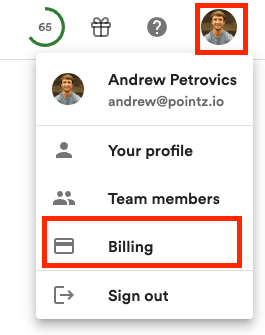
This will open Stripe’s customer portal where you can upgrade, downgrade, and/or cancel your subscription along with updating any payment methods and viewing your payments and more.
You can also upgrade and downgrade your plan by visiting our pricing page.
You will only see the Billing option if you have a paid subscription. Otherwise you will see an Upgrade button.
FAQs
When do credits / blog posts get reset?
When do credits / blog posts get reset?
At the first of every month regardless of when subscribed.
Can I get a refund?
Can I get a refund?
We currently offer a 1 blog post per month free trial for you to try out Video To Blog to see if it meets your needs. In order to keep Video To Blog as low cost as possible we do not offer refunds due to the increase support costs.
Can I get an invoice?
Can I get an invoice?
Unfortunately Stripe customer portal does not offer the ability to download invoices so we are not able to send you an invoice. However, you view all your payments in the customer portal and can simply take a screenshot and it should suffice as documentation to give your company for expense reports.
Was this helpful?
Still need help? Ask the team