Custom Instructions
Written By Andrew Petrovics
Last updated Over 1 year ago
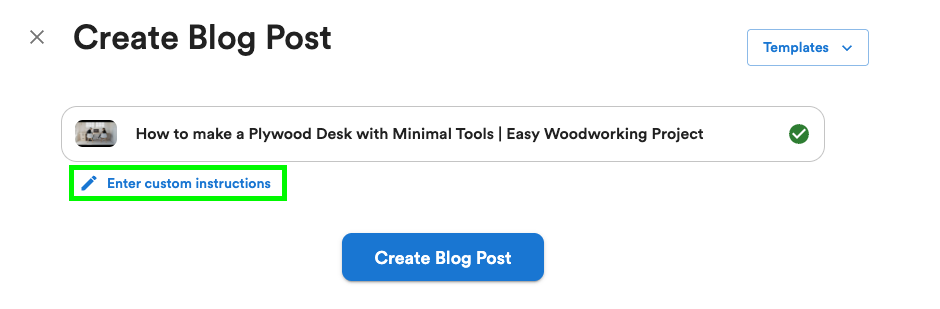
Custom instructions are an extremely powerful way to customize your blog post exactly to your liking. You can do things like add writing examples, add sources, customize tone, and much more. These instructions get sent directly to our AI.
Tip: You can include links to articles in custom instructions and they will automatically be parsed by the AI.
To add custom instructions click the “Enter Custom Instructions” button when creating your blog post.
Examples
You can do so many things with custom instructions. This is just a small list of things you can do…
Customize tone
Customize tone
Write in a casual, conversational, and optimistic toneAdd a custom outline
Add a custom outline
Use the following outline…
• Header 1
• Header 2
...
Optimize on keywords
Optimize on keywords
Optimize on the following keywords…
• Keyword 1
• Keyword 2
…
Add writing examples
Add writing examples
Using links…
Write in the same tone, voice, and structure as the following articles…
• https://www.website.com/article_1
• https://www.website.com/article_2
...
Using raw content…
Write in the same tone, voice, and structure as the following articles…

<example-article>
{{ ADD IN ARTICLE CONTENT HERE }}
</example-article>

<example-article>
{{ ADD IN ARTICLE CONTENT HERE }}
</example-article>

…
Add sources
Add sources
Using links…
Use the following articles as sources…
• https://www.website.com/article_1
• https://www.website.com/article_2
...
Using raw content…
Use the following articles as sources…

<source>
{{ ADD IN ARTICLE CONTENT HERE }}
</source>

<source>
{{ ADD IN ARTICLE CONTENT HERE }}
</source>

…
Provide additional context
Provide additional context
There are two speakers in the video. The interviewer is name “John” and the person being interviewed is named “Bob”Add a table with relevant data
Add a table with relevant data
Using data from the video (if applicable)…
Add a table using the data discussed in the video.Providing your own data…
Add a table using the following data…
<table-data>
{{ ADD IN TABLE DATA }}
</table-data>
Customize screenshots
Customize screenshots
Add only 2-3 screenshots and only add screenshots from the second half of the video.Customize stock images
Customize stock images
Include stock images related to dogs and cats or other household animals.Important!
Only links to articles can be parsed by our AI. If you’re including links to non-articles, you will need to include a link description (or the content itself) to the AI so it understands. You will see a warning for any links you include that cannot be parsed by our AI.
Additional Resources
I highly recommend looking over these guides for prompting techniques in general…
Anthropic’s Prompt Engineering Guide
Was this helpful?
Still need help? Ask the team